Do not miss out on great projects! Complete your translator
profile.
We saved your progress.
Certified rewards$0
translate
Candidate skills assessment
Submit a sample translation
Prepare a polished translation in Microsoft Word so our team can evaluate your translation accuracy,
formatting, and certification skills.
1
Choose a sample government form
Translate either the sample birth certificate or the National Archives Selective Service System Records
Request form. The birth certificate sample has two pages; you may translate page 1 only or both pages.
Both forms contain no names or personal details, so you may add any fictional details you choose as you
translate.
These blank U.S. government forms are provided solely for
evaluating translation and document-formatting skills. They do not contain personal information and are
not valid completed government records. Do not sign, certify, notarize, or submit a completed translation
to any government agency. Sources: U.S. Department of Health and Human Services, Centers for Disease
Control and Prevention, National Center for Health Statistics; and the U.S. National Archives and Records
Administration.
2
Translate it in the company letterhead
Translate the selected page or pages into your native or target language directly in the Microsoft Word
letterhead. Follow every instruction in the file and complete the certification with your own
handwritten signature image on a transparent background.
If both your native language and target language are English, you
may instead translate any sample document from your source language into English. Choose a document that
contains a table with cells so we can also evaluate your document-formatting skills.
Keep body content slightly in from the margins to avoid printing issues.
Bold every title and subheading.
Use tables or text boxes to mirror complex layouts.
Translate or clearly label stamps, seals, photos, and signatures.
Add a fully completed certification page to the end of every translation.
If you are translating into English, use the U.S. date format MM/DD/YYYY in the certification
(example: 07/11/2026).
Certification and final review
Replace every bold placeholder with information from inside the translation. Use the document's
actual title; if none exists, use a descriptive phrase such as "copy of a property sale agreement."
Never take a title from the file name.
Sign by hand in blue ink, scan or photograph the signature, save it as a transparent PNG, and insert
it into the certification. Typed or script-font signatures are not accepted.
Do not paste an OCR-converted document into the letterhead. Rebuild the layout cleanly so the
letterhead, margins, and page structure remain intact.
Remove comments, tracked changes, highlights, and unused placeholders before submitting.
Review every page at 100% zoom and in Print Preview. Fix distortions, misalignment, overlapping text,
blank pages, split tables, and any content cut off at the margins.
Keep images proportional and clear. Do not stretch seals, signatures, or source-document graphics.
Final step
Upload your completed Word translation
Submit one DOC or DOCX file, up to 3 MB. Uploading again replaces your current submission.
Earn $1 per eligible PDF delivered directly to the client. Admins review every delivery and may revoke
points when requirements are not met.
Certified rewards are paid in addition to your assignment compensation.
Rewards are redeemable once your total certified rewards reach $20, and can be listed on PayPal/Payoneer
invoices as “certified rewards.”
Certified and ATA-certified translations must use our letterhead.
Every translation must include a properly filled certification on the last page.
Upload matching Word and PDF files for each translation.
Business or not-for-direct-send orders are not eligible.
Keep this reference open when you need template files, profile details, or a reminder of the terms you
agreed to as a D&T translator.
drawImportant update: handwritten signatures requiredEffective July 10, 2026, D&T certified
translations must use scanned handwritten signature images instead of typed signature fonts.expand_less
Action required for all translators
Replace typed signature fonts with your own scanned handwritten signature image
D&T Translations is transitioning from typed signature fonts to scanned handwritten signature
PNGs on all Certificates of Translation Accuracy. Typed signature fonts, cursive fonts, plain
typed names, and auto-generated signature-style text are no longer acceptable for certified
translations.
EffectiveJuly 10, 2026
Why this change is happening
This update follows the new USCIS rule titled "Signatures on Immigration Benefit Requests,"
effective July
10, 2026. The rule strengthens USCIS enforcement of signature requirements and permits USCIS to
reject or deny immigration benefit requests that do not contain a valid signature.
Audio/video certification updated: Translators must download this updated
certification and replace their old audio/video certification template before their next recording translation.
No longer acceptable
Typed cursive or script fonts
Fonts that convert a typed name into a signature
Plain typed names in place of a signature
Automatically generated signatures never personally written by hand
Signature images with visible white, gray, yellow, or mismatched background rectangles
Another person's signature image
Required format
Your own genuine handwritten signature
Originally written with pen and paper
Clearly scanned or photographed
Cropped closely around the signature
Saved as a transparent PNG
Inserted without stretching, distortion, or a visible background box
Step 1: Create your handwritten signature
Use a clean white sheet of paper and a blue pen. Sign your name several times and
choose the clearest version. Avoid lined paper, shadows, wrinkles, colored backgrounds, or
overlapping text.
Step 2: Scan or photograph it
A scanner produces the cleanest result, but a phone camera is acceptable. Translators may also use
built-in
scan tools such as the scan functionality in the Notes app on iPhone, similar built-in and free
scanner tools
on Android smartphones, or any scanner app from the Apple App Store or Google Play. Use bright, even
lighting. Hold the camera directly above the paper. Avoid shadows, blur, filters, or perspective
distortion.
Step 3: Crop the image
Crop away excess paper while leaving a small margin around the signature. Do not cut off any
signature strokes. Free ways to crop the image include the built-in Windows Photos app, Preview or
Photos on Mac, and standard image editing tools already included on most smartphones.
Step 4: Remove the background
Removing the background prevents a visible white rectangle from appearing on the certification
page. The goal is a transparent PNG that blends naturally with the document.
Method A: Windows 11 Photos
Open the image in Photos, select Edit Image, open the Background tool, choose Remove, confirm
the signature stays intact, and save the result as PNG.
Method B: Microsoft Word
Insert the image into Word, select Picture Format > Remove Background, refine with Mark
Areas to Keep or Remove, then save the finished image as PNG.
Method C: PowerPoint
Insert the image into a slide, use Picture Format > Remove Background, refine the selection,
and save the result as PNG.
Method D: Paint 3D
Use Magic Select, isolate the signature, enable Transparent Canvas, and export the result as
PNG.
Method E: Free online tools
You may use reputable services such as remove.bg, Adobe Express Background Remover (a free online background remover for
images), or Canva.
Upload only the isolated signature image, not IDs or documents containing personal information.
Step 5: Verify and insert it into the certification
Before using the signature image, confirm the background is transparent, no white rectangle
remains, all strokes are visible, the image is not blurry, and the file is saved as PNG format. Then
open the updated certification, complete all required fields, insert the PNG into the designated
signature area, resize proportionally using a corner handle, confirm it does not cover any text, and
save the completed certification. In Microsoft Word, translators may need to use the Wrap Text
function to position the signature image properly. The In Front of Text or Square options may work
best for easier positioning.
What is changing?
For every certified translation, translators must write their signature by hand using pen and
paper,
scan or photograph the signature, remove the image background, save the finished signature as a
transparent PNG file,
and insert the PNG into the designated signature area of the certification file. Once properly
created,
the same signature PNG may be reused for future certifications signed by that translator.
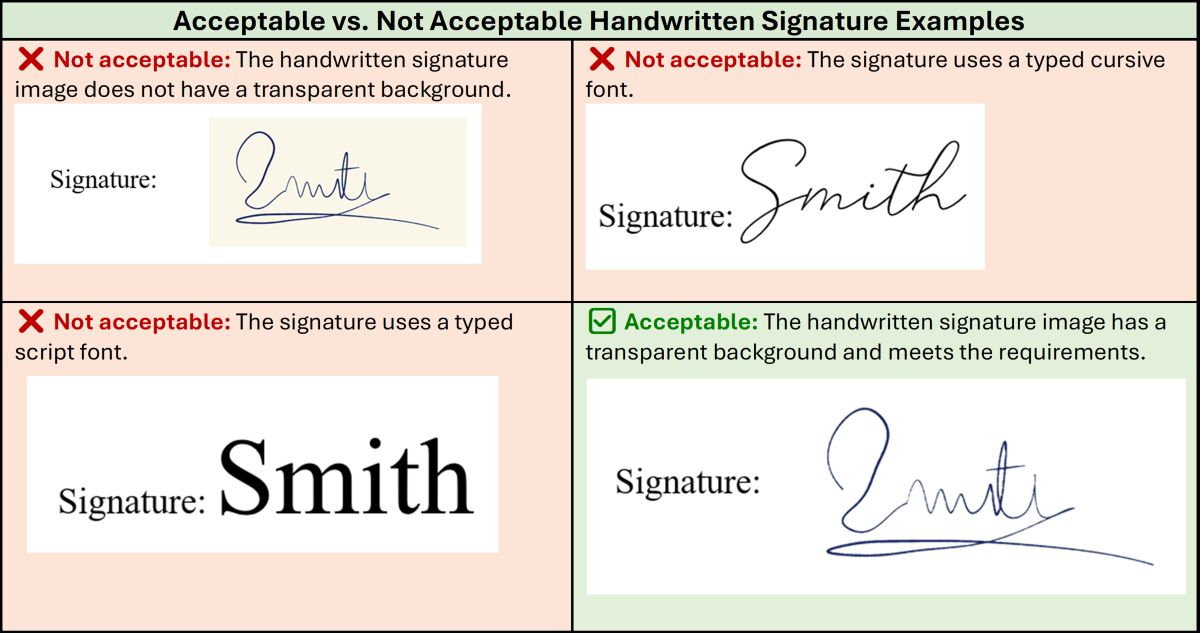
Use the transparent handwritten signature example as your standard. Typed fonts and
signature images with visible backgrounds are not acceptable.
Updated certification workflow
Each certified translation order will include the updated certification file. Download the
certification supplied with the assignment, complete all required information, insert the
handwritten signature image, review all certification details, and submit the completed
certification together with the translation.
Which certification should you use?
Sworn translators do not need to use the D&T company letterhead and certification for sworn
translations unless they also complete regular certified translations for us. ATA-certified
translators should continue using the ATA-certified certification when the assignment requires it.
If an ATA-certified translator receives a regular certified order that does not require ATA
certification, use the certification specified for that order.
Each order card will specify which certification to use. Always follow
the certification instructions shown inside the assignment.
D&T tutorial video
This tutorial demonstrates creating a handwritten signature, scanning or photographing it, removing
the
background, saving as PNG, inserting it into the certification, and avoiding common mistakes.
Technical support
For technical support with the translator profile or questions about this signature workflow,
contact us by email or WhatsApp.
This entire notice or update, including the full text and tutorial, is also available in the
Translator Knowledge Base. You can access it by clicking the question mark icon in the top
navigation bar.
descriptionLegacy DOC files for older Microsoft WordUse the DOCX files shown in each English-certified
order first. These DOC files are kept here only for older Word installations or compatibility
issues.expand_less
Portrait remains the default layout. Use landscape only when the source
layout cannot be recreated cleanly in portrait.
paymentsPaymentsInvoice timing, PayPal, Payoneer, and Proz Pay
instructions for translator payments.expand_less
Payment policy: please use your own account
To help us pay you securely and keep our records accurate, all PayPal, Payoneer, and ProZ Pay invoices and payment requests must come from an account owned by you.
The account holder's name and the name shown on your invoice or payment request must match your name in your D&T translator account, resume, applicable W-8BEN or W-9, and ProZ.com / TranslatorsCafe.com profiles, where applicable. Name mismatches are not permitted.
Please do not use an account belonging to a friend, family member, or any other third party, even with their permission.
This policy helps us:
Protect your payments against fraud or redirection to another person.
Keep invoices, tax documentation, and payment records consistent.
Reduce the risk of payment holds, rejected transfers, and ownership disputes.
Learn more: why names must match
We understand that payment services are not equally available everywhere. This policy protects both you and D&T by keeping the person who performed the work clearly connected to the payment.
Payment-service checks and delays. Payment providers may need to verify the account holder and the purpose of a payment. Using another person's account can create questions about who earned the funds, leading to extra checks, payment holds, rejected transfers, or account restrictions. This can delay your access to payment and disrupt our ability to pay translators.
Identity and payment restrictions. D&T needs to know who is receiving payment and follow applicable sanctions and payment restrictions. A third-party account makes that harder to verify. Another person's account must never be used to bypass country, identity, or sanctions restrictions.
Your control over your earnings. Money sent to a friend or family member goes into an account they control. If they do not pass it on, lose access, or become involved in a dispute, you may have difficulty accessing or recovering your earnings. D&T may also face a dispute about whether you received payment for your work.
Clear tax and accounting records. Your invoices, applicable tax forms, and our payment records need to identify the translator who provided the services. A different recipient's name creates discrepancies that may require additional documentation or corrections and complicate tax reporting or an audit for those involved.
Protection against fraud. Matching names helps us spot an altered invoice, a compromised email account, or an attempt to redirect your payment. Consistent details help protect your earnings and D&T's payment process.
These are risks we want to prevent, not an assumption that you have done anything wrong. If you have a name discrepancy or difficulty receiving payment in your own name, please contact billing@dttranslations.com before submitting your request so we can review the situation with you.
We cannot process invoices or payment requests with mismatched names or third-party payment accounts. If your name has changed, your records do not match, or you cannot receive payment through an account in your own name, please contact billing@dttranslations.com before submitting an invoice or payment request.
Thank you for helping us keep payments secure and accurate. You can review this policy at any time in the Payments section of the translator knowledge base.
Invoices are now paid within 45-60 days of receipt by means of PayPal or Payoneer. This updated
term reflects a temporary backlog caused by recent financial setbacks. If your invoice or payment
request was already submitted under the prior 30-day term, it will still be paid within 30 days of
receipt. If it goes beyond 30 days, please email us at billing@dttranslations.com or reach out to us on
WhatsApp at +1 973 851 6007. For new invoices and payment requests, please use the updated
45-60 day term. PayPal invoices must be sent to invoice@dttranslations.com.
PayPal invoice instructions
The invoice or payment request must be made on the PayPal or Payoneer website and sent to invoice@dttranslations.com.
Please send only one invoice for all orders completed within no less than 15-30 days.
Keep each invoice or request at or below $500. If the total amount is greater than $500,
simply send another request or invoice.
PayPal item instructions
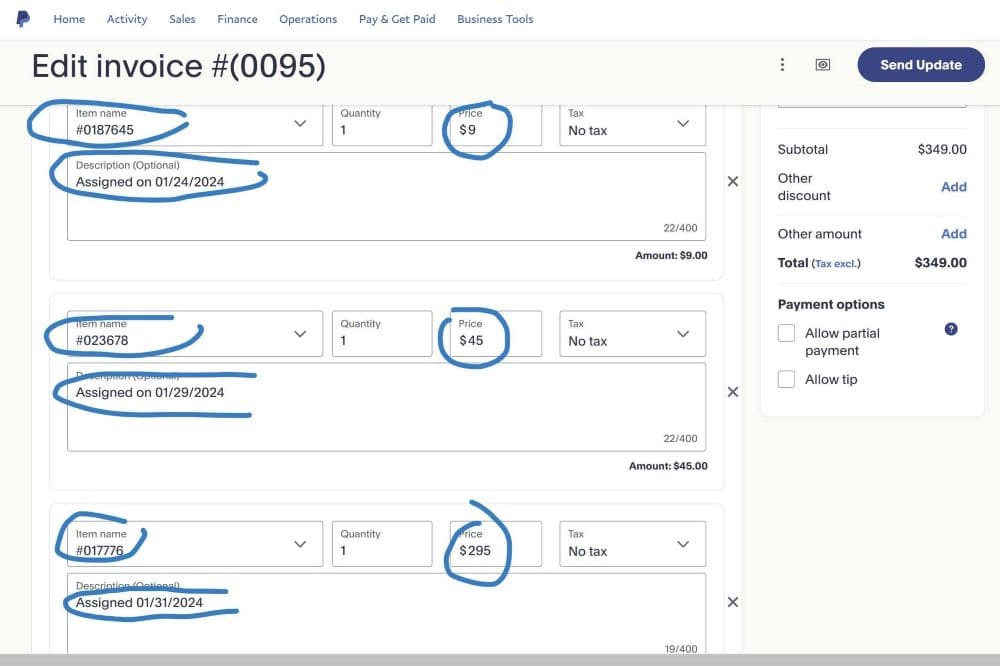
In the item name field, indicate only the order number, for example: #01099123. Do not place
any other information or words in the item name field.
In the item price field, indicate the given amount. For example, if the assignment shows 24
hours - $10 - #01099123, then $10 is the amount to enter for that order.
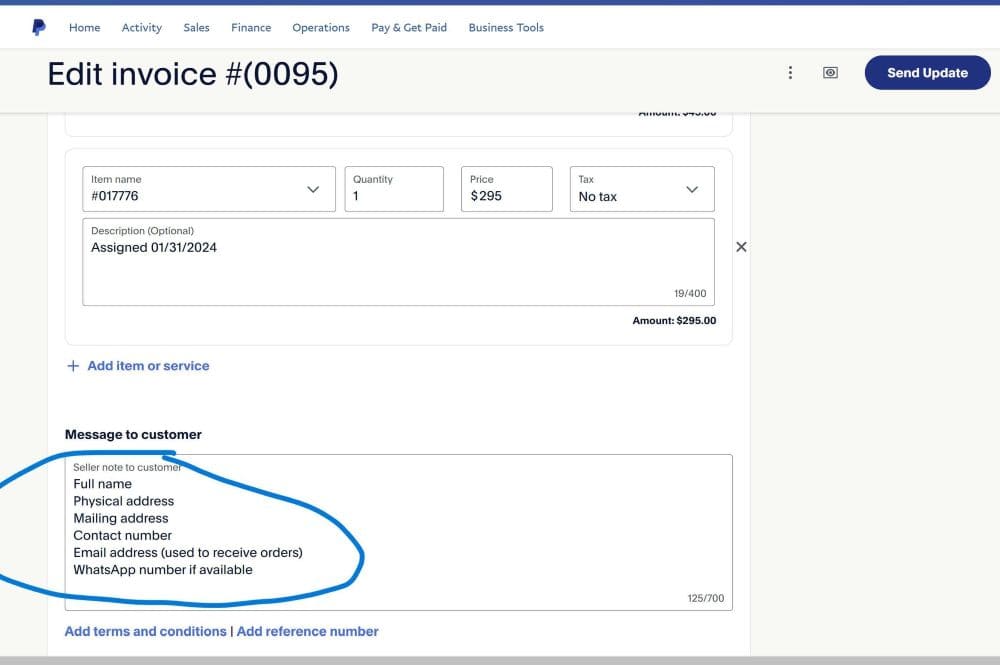
In the Message to Customer field, indicate your full name, mailing address, email address,
cell phone, and WhatsApp number.
If you do not have the ability to send PayPal invoices, you can send a PayPal payment request. In
the description field, list only the order numbers and their corresponding rates, for example:
01099123 - $10, 01099453 - $20, 01099942 - $35. Please do not include any other information or words;
otherwise, our payment system may reject it.
Payoneer instructions
When sending a Payoneer payment request, kindly list all order numbers and their corresponding
rates without any other words or information in the description field, for example: 01099123 - $10,
01099453 - $20, 01099942 - $35.
Proz Pay
If you cannot use PayPal or Payoneer in your country, we can make payments to you via Proz Pay.
You simply need to list all order numbers and rates as explained above. Learn more about Proz Pay. At this time, we do not offer payments via direct
bank transfers or checks.
PayPal invoice visual instructions
Do not add the "Assigned on" text into the description;
the order number and rate are enough.
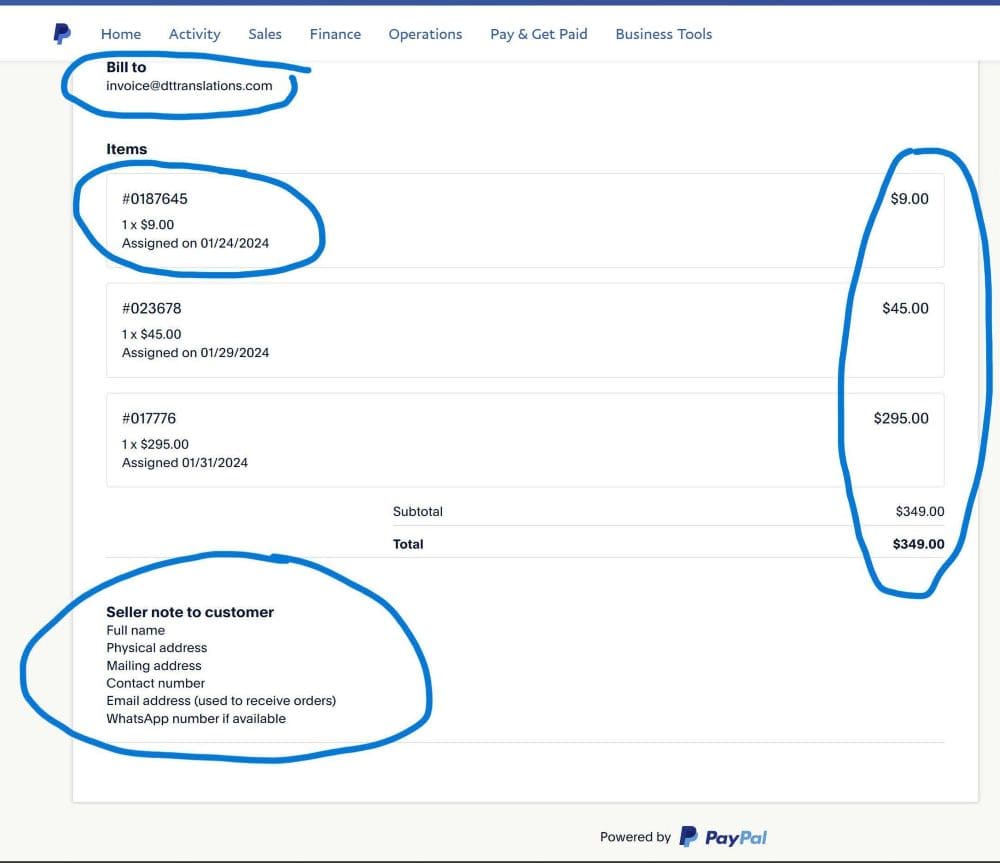
Use only the order number in Item name and the order amount in Price.Add your contact details in Message to Customer.Review the invoice preview before sending it to invoice@dttranslations.com.
contact_supportWhere to direct inquiriesUse the correct channel for platform projects,
urgent issues, billing, and email assignments.expand_less
Platform Projects
If assigned via your D&T account, use the Order Box Chat.
Use the Private Toggle to message the Admin/Project Manager
exclusively.
Projects assigned via projects@dttranslations.com are prioritized. If
you do not receive a response, follow up via Support or WhatsApp.
account_circleYour translator profileThis overview helps you check what we use for
assignment matching and operational decisions.expand_less
Loading profile details...
To change any other profile details, use the Update profile button below.
upload_fileSample translation uploadOpen the sample guide to download a practice
document, review the formatting requirements, and upload your completed Word translation.expand_less
Candidates and eligible new translators can use this guided assessment to demonstrate translation
accuracy, Microsoft Word formatting, and certification skills.
receipt_longTax document setupOpen the tax document panel to confirm your service
location and provide the applicable form.expand_less
Open this panel to add or replace your tax documents. Candidates may complete tax setup before
approval; translators who have not completed it will be prompted after two assignments.
gavelTerms and expectations reminderThese are the translator terms from the
application/profile form, shown here for quick reference.expand_less
Loading terms...
Loading availability...
Enter your email
Please enter your email address to complete the sign-in process.
Profile update
Which professional services do you provide?
Help us match you with assignments that fit your skills.
help
You can update Professional services later in Profile overview within the Translator Knowledge Base. Open it
from the question mark icon in the top navigation bar.
help
You can update Professional services later in Profile overview within the Translator Knowledge Base, opened
from the question mark icon in the top navigation bar.
Policy notice
Important Update: Handwritten Signatures Required for All Certified
Translations
D&T Translations is transitioning from typed signature
fonts to scanned handwritten signature images on all Certificates of Translation Accuracy.
Action Required for All Translators
D&T Translations is changing its signature procedure for all certified translation orders.
Effective immediately, every Certificate of Translation Accuracy must include a scanned image of the
translator's genuine handwritten signature. Typed signature fonts, cursive fonts, and automatically
generated signature-style text must no longer be used.
Why Are We Making This Change?
This update follows the new USCIS rule titled "Signatures on Immigration Benefit Requests," effective
July 10, 2026. The rule strengthens USCIS enforcement of signature requirements and permits USCIS to
reject or deny immigration benefit requests that do not contain a valid signature.
Audio/video certification updated: Translators must download this updated
certification and replace their old audio/video certification template before their next recording translation.
What Is Changing?
For every certified translation, translators must write their signature by hand using pen and paper,
scan or photograph the signature, remove the image background, save the finished signature as a
transparent PNG file, and insert the PNG into the designated signature area of the certification file.
Once properly created, the same signature PNG may be reused for future certifications signed by that
translator.
Use the transparent handwritten signature example as your standard. Typed fonts and
signature images with visible backgrounds are not acceptable.
No Longer Acceptable
Typed cursive or script fonts
Fonts that convert a typed name into a signature
Plain typed names in place of a signature
Automatically generated signatures that were never personally written by hand
Signature images with visible white, gray, yellow, or mismatched background rectangles
Another person's signature image
Required Format
Your own genuine handwritten signature
Originally written with pen and paper
Clearly scanned or photographed
Cropped closely around the signature
Saved as a transparent PNG
Inserted without stretching, distortion, or a visible background box
Step 1: Create Your Handwritten Signature
Use a clean white sheet of paper and a blue pen. Sign your name several times and choose the clearest
version. Avoid lined paper, shadows, wrinkles, colored backgrounds, or overlapping text.
Step 2: Scan or Photograph It
A scanner produces the cleanest result, but a phone camera is acceptable. Translators may also use
built-in scan tools such as the scan functionality in the Notes app on iPhone, similar built-in and free
scanner tools on Android smartphones, or any scanner app from the Apple App Store or Google Play. Use
bright, even lighting. Hold the camera directly above the paper. Avoid shadows, blur, filters, or
perspective distortion.
Step 3: Crop the Image
Crop away excess paper while leaving a small margin around the signature. Do not cut off any signature
strokes. Free ways to crop the image include the built-in Windows Photos app, Preview or Photos on Mac,
and standard image editing tools already included on most smartphones.
Step 4: Remove the Background
Removing the background prevents a visible white rectangle from appearing on the certification page.
The goal is to create a transparent PNG that blends naturally with the document.
Method A: Windows 11 Photos App. Open the image in Photos, select Edit Image, open
the Background tool, choose Remove, verify the signature remains intact, then save the result as a
PNG.
Method B: Microsoft Word. Insert the image into Word, select Picture Format >
Remove Background, refine the selection using Mark Areas to Keep or Remove, then save the finished
image as a PNG.
Method C: PowerPoint. Insert the image into a slide, use Picture Format > Remove
Background, refine the selection, and save the result as a PNG.
Method D: Paint 3D. Use Magic Select, isolate the signature, enable Transparent
Canvas, and export the result as a PNG.
Method E: Free Online Background Removal Tools. If no desktop tool is available,
translators may use reputable online services such as remove.bg, Adobe Express Background Remover (a free online background remover for
images), or Canva.
Only upload the isolated signature image, not identification
documents or documents containing personal information.
Verify the Finished Signature
Before using the signature image, verify that the background is transparent, no white rectangle
remains, all signature strokes are visible, the image is not blurry, and the file is saved as PNG
format.
Insert the Signature into the Certification
Open the updated certification file, complete all required fields, insert the PNG signature image into
the designated signature area, resize proportionally using a corner handle, verify that it does not
cover any text, and save the completed certification. In Microsoft Word, translators may need to use the
Wrap Text function to position the signature image properly. The In Front of Text or Square options may
work best for easier positioning.
Updated Certification Workflow
Each certified translation order will include the updated certification file. Translators must download
the certification, complete all required information, insert the handwritten signature image, review all
certification details, and submit the completed certification together with the translation.
Certification Instructions by Assignment Type
Sworn translators do not need to use our company letterhead and certification for their sworn
translations unless they do regular certified translations for us as well. ATA-certified translators
should continue to use the ATA-certified certification unless they do regular certified orders that do
not require an ATA-certified translator. Each order card will specify which certification to use. They
should follow the certification instructions present in each assignment.
D&T Translations Tutorial Video
This tutorial demonstrates creating a handwritten signature, scanning or photographing it, removing the
background, saving as PNG, inserting it into the certification, and avoiding common mistakes.
Technical Support
For technical support with the translator profile or questions about this signature workflow, contact
us by email or WhatsApp.
This entire notice or update, including the full text and tutorial, is also available in the Translator
Knowledge Base. You can access it by clicking the question mark icon in the top navigation bar.
I
understand that typed signature fonts are no longer accepted on D&T Translations certified translation
certificates. I will use my own scanned handwritten signature, remove its background, save it as a
transparent PNG, and insert it into the designated signature area of the updated certification file.
Verify your email
Please check your inbox and click the verification link we sent to you.
Set your password
Enable 2-step Authentication
SMS Authentication
For added security, please enable SMS authentication.
visibility
OR
If SMS Authentication does not work in your region or country, you can use an authenticator app, instead.
For example, Google Authenticator can be downloaded from the Apple App Store or Google Play Store.
Authenticator App
Protect your account with 2 Step TOTP Verification
or use this secret key if your authenticator app does not support
QR codes:
visibility
SMS Notifications
Would you like to receive SMS notifications about new orders and other important updates?
×
Profile Features and Workflow Updates
Complete your translator profile
We need a few final details to finish your profile. Your progress is saved automatically.
Fields marked (required) must be completed before submitting.
Profile complete
Thank you! Your profile data is now complete.
Contact
Location
Your service location may differ from your current location. We ask for
it to protect your account and meet legal and tax requirements. Knowing whether you work from the US or
abroad helps us comply with applicable federal and state employment laws.
Why do we collect your location?
Why We Request Your Location Information for Translation Services
At D&T Translations, our commitment to accuracy, quality, and the integrity of our certified
translations is paramount. To uphold these rigorous standards and ensure the highest level of trust in
our services, we require the collection of your geographical location via your browser during the
application process. This measure is essential for several key reasons, contributing to the security and
validity of our certified translation services:
Preventing Fraud and Impersonation
In the digital landscape, preventing malicious actors such as imposters, hackers, and spammers is a
continuous effort. By recording location data, we add a critical layer of verification, making it
significantly more difficult for unauthorized individuals to misrepresent themselves or engage in
fraudulent activities. This helps protect both our clients and our network of legitimate
translators.
Ensuring Authenticity for Certified Translations
Certified translations often carry significant legal weight and are submitted to governmental,
academic, and legal institutions. For these documents to be accepted, the issuing authority often
requires assurance of the translator's authenticity and the verifiable existence of the professional
behind the certification. Knowing the translator's general location provides an important piece of
this puzzle, helping to establish a traceable and credible chain of custody for the translation.
Compliance with Legal and Industry Standards
While specific requirements vary by jurisdiction, many legal and official bodies require certified
translations to include certain details about the translator, which may implicitly or explicitly
relate to their geographic presence or the jurisdiction in which they operate. Collecting location
data helps us align with these evolving international and national standards, minimizing the risk of
document rejection due to non-compliance.
Geolocation for Specialized Services (Where Applicable)
For certain highly specialized translation needs, or in cases where local legal regulations might
apply, having an understanding of a translator's geographical base can be beneficial for matching
the right expert to a specific project. This helps us ensure that our translations are handled by
professionals with not only linguistic and subject matter expertise but also relevant regional
knowledge when necessary.
Enhancing Network Security and Trust
This data contributes to our overall security infrastructure, allowing us to identify unusual
access patterns or potential security breaches more effectively. It fosters a more secure
environment for all users within our platform, building a stronger foundation of trust between
D&T Translations, our clients, and our valued translators.
We understand the importance of privacy and assure you that this data is collected and stored securely,
solely for the purposes outlined above. Your cooperation in providing this information is invaluable to
maintaining the high standards and legal validity that define D&T Translations.
Education & Qualifications
We collect this information to match you with the right projects. Our
assignments vary from simple personal documents to complex technical manuals, so accurate qualifications
help us route work appropriately.
If you do not have a degree major or specialization, enter "Not applicable".
ATA membership is not the same as ATA certification.
ATA membership means you belong to the American Translators Association. ATA
certification means you personally passed the ATA certification exam in a supported language pair and
appear in the ATA directory as certified.
If you select either ATA option, you must confirm it and provide the matching
ATA number plus your ATA profile link. ATA membership alone does not qualify you for ATA-certified
assignments.
ATA Certification Verification
Only select this if your ATA directory profile shows you as an
ATA-certified translator.
ATA Membership Verification
Only select this if you are an ATA member. ATA membership does not mean
ATA-certified translator status.
Experience (required)
MS Word formatting skills (required)
The majority of our projects involve official documents (e.g., vital records, academic transcripts,
legal documents) that require recreating the source document's format in MS Word. This often includes
elements like tables, text boxes, headers/footers, and consistent page layout. Please indicate your
proficiency:
Preferred rate range (USD per word) (required)
Select at least one rate range. Choose every rate range you are open to. Lower ranges
usually bring more orders. Higher ranges can pay more, but they come in less often.
How Order Volume Usually Works
Most regular certified translation and business translation orders are in the lower ranges. Tier 1
and Tier 2 languages are often $0.03 - $0.04. Tier 2 and Tier 3 languages are often
$0.04 - $0.06. Tier 4 and Tier 5 languages are usually $0.07 -
$0.09. Rates from $0.07 - $0.12 and up are much less frequent and are more
common for expedited, technical, or sworn work.
Maximize Your Monthly Revenue
"Our data shows that translators who select 'High Volume' tiers ($0.03 - $0.06) earn up to 60% more per
month due to consistent order flow and reduced downtime. Choosing a lower rate allows our system to
prioritize you for the bulk of our certified and business translation traffic."
sync_alt
More regular work
Lower ranges usually bring the most consistent order flow.
done_all
Your choice stays flexible
If an offer is not a fit for you, you can always accept or decline it.
schedule
Higher ranges are rarer
Rates from $0.07 and up can pay more, but they appear much less often.
tune
Simple
Tip
Lower ranges usually bring more orders
Many translators keep $0.03 - $0.04 or $0.04 - $0.06
selected for regular work, then add a higher range if they also want premium jobs.
tips_and_updates
Simple tip: if you want more regular offers, keep at least one lower range selected. You can still add
higher ranges for premium jobs.
Market Realities
Why lower tiers can still earn more overall
In the current US market, high-ranking agencies maintain dominance through a high-volume, low-margin
model. To compete with AI-integrated services and the current economic climate, we prioritize speed and
scale.
While our Tier 1 and Tier 2 rates ($0.03 - $0.04) may seem lower than boutique rates, they are designed
for maximum turnover. Our system is optimized to feed you a steady stream of short certified translation
and business translation jobs that can be processed quickly. Many of our top-earning translators choose
these rates because they spend less time hunting for work and more time billing.
Feature
High-Volume Tier ($0.03 - $0.04)
Premium Tier ($0.10 - $0.12)
Work Pattern
Regular flow with repeatable work
Intermittent, higher-ticket work
Typical Task
Standard certified translation
Complex technical or sworn work
Speed
Faster because the formats repeat
Slower because research and review are heavier
Marketing Effort
Low, because we provide the order flow
Higher, because the right projects appear less often
Monthly Stability
More predictable
More variable
AI-Enhanced Efficiency
We recognize the impact of AI on the industry. Our platform is designed to help you use these tools
to increase your words per hour. With a streamlined workflow for standard certified translation,
lower-rate work can still produce stronger overall earnings by reducing idle time between jobs.
Profile photo (required)
Why do we request a profile photo?
Why We Request a Profile Photo
We request a profile photo to keep our translator network secure, trustworthy, and professionally
verified. This helps us:
Verify identity and reduce impersonation: A photo adds an extra layer of
verification to help prevent fraud or unauthorized access.
Maintain platform trust: Clients and internal reviewers can feel confident that
certified work is tied to a verified professional.
Support account security: Photos help us detect unusual activity and safeguard
accounts.
Ensure professionalism: A consistent, identifiable profile improves quality
standards and accountability.
Your photo is stored securely and used only for verification, security, and quality assurance purposes.
No file chosen
0%
National ID (required)
Why do we request your national ID?
Why We Request Your National ID
At D&T Translations, our commitment to the highest standards of accuracy, authenticity, and legal
compliance in certified translations is paramount. To uphold these rigorous standards and ensure the
integrity of your work, we require the submission of a copy of your national ID (such as a driver's
license or passport). This measure is essential for several key reasons:
Identity Verification & Trust: For certified translations, verifying the
identity of the translator is fundamental. Your national ID helps us confirm your identity, building
trust with our clients and the institutions that rely on our certified translations.
Preventing Fraud & Impersonation: This document adds a critical layer of
security, making it significantly more difficult for unauthorized individuals to misrepresent
themselves or engage in fraudulent activities within our platform.
Legal & Regulatory Compliance (KYC): Many jurisdictions and official bodies
require stringent identity verification (Know Your Customer or KYC procedures) for professionals
involved in official document processes, including certified translation. Submitting your national ID
helps us comply with these evolving international and national standards, minimizing risks for all
parties.
Accountability & Quality Assurance: By verifying your identity, we enhance the
accountability of our translation processes, ensuring that every certified translation is handled by a
verifiable and responsible professional.
We understand the importance of your privacy and assure you that your national ID document is collected
and stored securely, solely for the purposes outlined above.
No file chosen
0%
PDF
Supporting documents (up to 3)
Please upload your resume, academic records, or other supporting
documents. You can upload up to 3 files (PDF or image formats only). Images will be automatically optimized.
Total size limit for all files is 3MB. If your files are too large, please compress them before uploading.
Why do we request supporting documents?
Why We Request Supporting Documents
Supporting documents help us verify your qualifications and match you with assignments that fit your
expertise. This benefits both translators and clients by improving quality and reducing rework.
Specifically, these documents help us:
Validate credentials: Academic records or certificates confirm relevant training
and expertise.
Improve assignment matching: Your background helps us route specialized work to the
right professional.
Build trust and accountability: Verified profiles strengthen confidence with
clients and institutions.
All documents are stored securely and used only for verification, compliance, and quality assurance
purposes.
Files: 0 / 3, Total Size: 0.00
/ 3 MB
Terms and Expectations for Translators (required)
Version 1.2
Please carefully read each subsection of our Terms and Expectations. Your
agreement to these terms is mandatory for collaboration with D&T Translations. To confirm your
understanding and acceptance, please check the box located within each subsection.
1. Translation Quality Standards
This section outlines D&T Translations' quality expectations, categorized by performance level.
Adherence to these standards is crucial for successful collaboration and compensation.
Unacceptable Quality (No Payment): Translations exhibiting significant
unprofessional errors, numerous omissions, or direct machine translation output without proper
post-editing and formatting adjustments. Such submissions will not be eligible for payment.
Substandard Quality (Payment at Risk): Translations showing some effort but
containing numerous careless mistakes or omissions, including machine translation with minimal
post-editing or formatting. Payment for such translations is contingent upon the translator promptly
and diligently correcting all identified issues, and only if the client agrees to extend the deadline.
Extensive correction processes leading to delays may result in order cancellation and full refund to
the client, rendering the translation unpaid.
Acceptable Quality (Requires Correction): Translations demonstrating professional
effort but containing minor errors or omissions. The translator is required to promptly and thoroughly
resolve all identified issues.
Good Quality (Minor Corrections Expected): Translations reflecting professional
diligence, with only minor, insignificant errors that may indicate a lack of meticulous review. The
translator is responsible for promptly correcting any identified issues.
Excellent Quality (Desired Standard): Translations that are meticulously formatted,
free of serious errors or omissions, and demonstrate a high level of linguistic accuracy and cultural
appropriateness. This is the standard we strive for.
2. Format and Appearance Requirements
This section outlines the mandatory formatting and appearance standards for all submitted translations.
Adherence to these guidelines ensures professional presentation and client satisfaction.
Accuracy and Completeness: Thoroughly proofread all translations for errors or
omissions in names, numbers, dates, grammar, syntax, and lexicon. If Machine Translation (MT) is
utilized, meticulous post-editing alongside the source text is required to eliminate MT errors,
nonsensical output, or mismatches. Manual re-translation is necessary where MT output is inadequate.
Visual Replication: Translations must adhere to the source document's formatting.
This includes recreating tables, utilizing text boxes, and accurately representing stamps, signatures,
logos, emblems, and other visual elements. Submitting plain text without appropriate formatting that
matches the original document is unacceptable. Every element present in the source document must be
accounted for in the translation.
Layout Consistency: For official documents (government agencies, colleges,
universities), translations must closely mirror the source document's layout. The placement of the
target text should correspond to that of the source text to ensure a high degree of textual and visual
resemblance.
File Naming Conventions:
Official Documents: Files must be named using the order number (e.g.,
"#12345"). For multiple files associated with the same order, append a sequential number (e.g.,
"#12345 1", "#12345 2").
Business Translations: File names should correspond precisely to those of the
original source files.
Standard Paper Size: All translations must be formatted to standard paper size (8.5
x 11 inches), unless it is a business translation where the source document's paper size differs. In
such cases, the original paper size should be accurately maintained.
Company Letterhead (Official Documents): All completed or corrected official,
academic, medical, financial, and legal translations must be submitted as client-ready files on our
company letterhead. The letterhead file will be provided for download.
Letterhead Integrity: The provided company letterhead must NOT be altered, shifted,
or misaligned. It is strongly recommended to perform the translation directly within the letterhead
file from the outset to prevent formatting issues.
Header/Footer Restrictions: Do not place any content in the header or footer
sections, nor copy and paste our letterhead into other files, as this often leads to significant
formatting discrepancies.
Font Specifications: The default font size should be 12pt, and the font type Times
New Roman. A font size of 10pt is permissible only if required by the original document's format. Font
size must not be lower than 10pt. All typed text must be black and white; colored fonts are not
permitted. Titles and other prominent text should be bold and appropriately sized to match the
emphasis in the original documents.
Right to Reject: D&T Translations reserves the right to reject or decline
payment for translations that are poorly formatted or contain errors.
3. Delivery Expectations and Punctuality
This section outlines our expectations regarding project delivery and the consequences of late
submissions.
Submission Format (Official Documents): All official, academic, medical, financial,
and legal translations must be completed using our provided company letterhead file (available for
download) and submitted in MS Word format within the designated "Accepted Section" of your translator
portal.
Submission Format (Business Translations): Business translations do not require our
letterhead and must be completed directly within the provided source files.
Proactive Communication for Delays: If you anticipate a delay in meeting a
deadline, you must notify us well in advance, clearly stating the additional time required.
Impact of Extensions: Requesting a deadline extension carries the risk of the
client requesting order cancellation and a full refund, which would result in non-payment for the
translation.
Justification: All deadline extension requests must be reasonable and fully
justified.
Consequences of Late Delivery: D&T Translations reserves the right to cancel
any order without payment if the translation is submitted past the agreed-upon deadline without prior
arrangement.
4. Revisions and Corrections Policy
This section outlines our policy and procedures for handling revisions and corrections.
Adherence to Source Text: All requested changes and corrections must be made in
strict accordance with the original source documents.
Discrepancy Reporting: If a client requests changes or corrections that do not
align with the original source text, you must not implement them. Instead, immediately report
the discrepancy to us, explaining why the requested changes do not match the source. We will then
communicate with the client to resolve the issue.
Certified File Revisions: When a correction request is issued, please ensure you
make changes to the specific files we attach, as these often contain our company's certification.
Correction Turnaround Time: Corrected translations are typically expected within
4-6 hours or by the end of the same business day. Failure to respond to a correction request within 12
hours may result in project cancellation and potential non-payment.
Contradictory Requests: It is imperative that you do not implement any requested
change that contradicts the original content of the document you translated. Should you identify any
contradictory revision requests, please report them to us immediately.
5. Confidentiality Agreement
This section details our strict confidentiality policy regarding client information and your
responsibilities as a D&T Translations collaborator.
D&T Translations is committed to the utmost security and privacy of our clients' personal
information. We maintain secure environments, regularly check our systems for vulnerabilities, and
employ robust measures to protect against data leakage or unauthorized access. All information is
securely disposed of through reasonable steps, subject to applicable retention requirements and
third-party limitations. Please be aware that both U.S. and
International Law impose severe penalties, including criminal charges, for the misuse of personal
information.
As a valued collaborator, we expect you to uphold equally stringent precautionary measures when
handling any information shared with you. Please adhere to the following guidelines:
Non-Disclosure: You must not share our customers' personal information, including
their documents, with any third parties without our explicit, direct consent, except for
service-related processing through tools permitted under the AI and CAT requirements below.
Secure Storage: All client information and documents must be stored exclusively in
secure environments and databases.
Timely Disposal: You are required to carefully and completely dispose of all
documents containing personal information provided to you once the translation work is finalized
(typically within one week of project completion).
AI, Machine Translation, and CAT Tools
You may select and maintain your own computer-assisted translation (CAT), machine translation,
and AI tools for terminology research, translation assistance, quality checks, and timely delivery.
We do not require a particular brand or a paid business or enterprise subscription. You remain
responsible for confidentiality and human review of your work.
Check external processing: Before sending client documents or identifiable or
confidential excerpts to an external service, confirm that its applicable terms, account settings,
and data handling are appropriate for the material and the project's confidentiality requirements.
A local CAT application may still send text to an integrated cloud machine translation engine.
No authorization for general-purpose training: Do not enable or authorize use
of client material to train or improve a provider's general-purpose AI models. Use available
training opt-outs and check the applicable terms; a paid subscription or a setting alone does not
establish adequate confidentiality or eliminate retention and human review.
Practical settings: In personal ChatGPT accounts, turn off "Improve the model
for everyone" before submitting any permitted client content. Do not submit response feedback
containing client material, as it may allow the associated conversation to be used for training.
For Gemini and other tools, review activity, model-improvement, and retention controls and their
current privacy terms; turning off activity does not necessarily stop all processing or retention.
Business/API protections vary by product and agreement.
Minimize disclosure: Use only the information necessary for the task. Prefer
generic terminology questions, suitable local/offline tools, or manual work where possible.
Removing names alone may not make document content anonymous or nonconfidential. If adequate
protections cannot be confirmed, do not submit the material externally and contact us about an
alternative workflow.
Project restrictions: Follow any AI or machine translation restrictions agreed
for the project. Tell us before processing documents if your tools or workflow cannot meet them;
do not proceed without clarification.
Deletion and cooperation: Apply the disposal timeframe above to order-related
chats, uploaded files, CAT projects, translation memories, and associated storage under your
control, subject to applicable legal retention requirements. Cooperate with our deletion requests
and confirm the actions taken and any known limitations. Deleting a chat may not delete separately
stored files or provider-held copies, and cannot be assumed to reverse prior model training.
Do not claim complete third-party deletion without evidence.
These requirements apply prospectively to client material processed after you agree. They do not
authorize unrelated disclosure or replace your confidentiality obligations.
6. Payment Procedures
This section outlines our payment methods. Detailed instructions for submitting payment requests or
invoices will be provided within your translator account.
D&T Translations processes payments via PayPal, Payoneer, or Proz Pay. Most payment
requests and invoices are now paid within 45-60 days of receipt. This updated term reflects
a temporary backlog caused by recent financial setbacks. If your payment request or invoice was already
submitted under the prior 30-day term, it will still be paid within 30 days of receipt. If it goes
beyond 30 days, please reach out to us for a status update. Comprehensive instructions on how to
create and submit your payment requests or invoices will be made available in your translator account
portal. Please keep in mind that any processing, transfer, withdrawal, or platform fees charged by
PayPal, Payoneer, or Proz Pay are the translator's responsibility and are paid directly by the
translator through the selected payment provider.
7. Project Assignment and Acceptance
This section details how project assignments are managed and our expectations for order acceptance and
communication.
Project Assignment Details:
Each assigned project's details will be provided in the dedicated order box within your translator
portal. This includes:
Deadline: The maximum time allocated for project completion.
Rate: The total compensation for the specific project.
Order Number: For reference and invoicing purposes.
Order Acceptance and Communication:
Prompt Acceptance/Declination: Please accept or decline assigned orders as soon as
possible.
Reporting Suspicious Content: You must immediately notify us if a document
submitted for translation appears suspicious, contains misplaced personal information, or any other
questionable content.
Timely Confirmation: Orders not accepted within our standard confirmation window
(typically 2-6 hours, or up to 12 hours for significantly different time zones) may be re-assigned to
another translator.
Early Notification for Accepted Projects: If you accept a project but later
determine you cannot complete it, you must notify us well in advance of the deadline.
Follow-Up Response: In certain cases, we may follow up regarding a project, and we
expect a response within 3-6 hours.
8. Dispute Resolution Policy
D&T Translations is committed to resolving any disagreements amicably and efficiently. In the event
of a dispute, controversy, or claim arising out of or relating to this Agreement, or the breach,
termination, or validity thereof, the parties may choose informal discussion or good-faith negotiation. Neither is required before seeking legal relief.
Informal discussions are optional and do not prevent a timely court or agency filing. The following court and governing-law terms apply:
Any dispute, controversy or claim arising out of or relating to this Agreement may be resolved in court; this Agreement does not require private arbitration, select the American Arbitration Association (AAA), or waive a right to a jury trial where available. Unless mandatory applicable law requires a different forum, an action shall be brought in a state or federal court in Florida or New Jersey that has jurisdiction and proper venue. Nothing restricts access to an appropriate government agency, small-claims court, or another forum required by nonwaivable consumer, worker or other legal protections. Informal discussions are optional and do not extend filing deadlines. This Agreement is governed by applicable federal law and the laws of the State of Florida, except that mandatory New Jersey law and other nonwaivable protections applicable to the person or transaction remain controlling. The Florida/New Jersey court provision does not override mandatory jurisdiction or venue rules. No particular county, court jurisdiction, or physical or remote hearing format is guaranteed; the court determines its procedures.
Agreeing to these terms does not waive your right to bring a claim in court or to exercise protected rights.
9. Certification of Information Accuracy
By agreeing to this section, I, the undersigned applicant, hereby certify that all information provided
in this application form, including but not limited to personal details, contact information,
qualifications, experience, language proficiencies, uploaded documents (such as profile picture,
national ID, resume, and supporting documents), and my agreement to the D&T Translations Terms and
Expectations, is true, accurate, complete, and current to the best of my knowledge and belief. I
understand that any false, inaccurate, or misleading information may result in the rejection of my
application or the immediate termination of any subsequent collaboration with D&T Translations.
10. Relationship and Tax Responsibilities
Submitting this application form does not establish an employer/employee relationship and does not
guarantee a position as a translator with D&T Translations. All translators and other collaborators,
such as Desktop Publishing (DTP) specialists, voice-over talents, and subtitle specialists, are
classified as independent contractors (freelancers).
Creating a candidate account is the first step in our review process and does not guarantee approval or
conversion to a full translator account. Approval of a full translator account also does not guarantee
work or a minimum, constant, or regular flow of projects. Translators are independent contractors, and
projects are offered only on an as-needed basis according to actual client demand, language pair,
qualifications, availability, and project requirements. We value our freelance team and continually
work to create more opportunities and provide projects whenever suitable work is available, but the
volume and frequency of assignments will vary.
As independent contractors, you are solely responsible for all your tax reporting and tax payments to
the relevant authorities in your jurisdiction.
Payment Processing and Tax Forms:
We primarily process payments through PayPal, Payoneer, and Proz Pay. Before D&T Translations can
begin processing your payments, you must provide the applicable tax form: Form W-9 if you are a U.S.
citizen, U.S. permanent resident, or other U.S. person for federal tax purposes, or Form W-8BEN if you
are a foreign individual. Your account's Tax set-up panel provides more information and allows you to
upload the appropriate completed form.
These forms document whether you are a U.S. or foreign person, certify your taxpayer information where
applicable, and help us determine whether any withholding or direct reporting is legally required. The
payment platforms may have their own reporting obligations, including issuing Form 1099-K when
applicable. To avoid duplicate reporting, D&T Translations generally does not issue a second
information return for amounts reportable by a payment platform, but we will withhold or report payments
when required by law.
Tax Obligations for Translators:
U.S. citizens, permanent residents, and other U.S. persons: You must provide Form
W-9 and are responsible for your own U.S. tax reporting and payments. D&T Translations does not
withhold taxes unless withholding is required by law.
Foreign individuals (Non-U.S. Citizens/Permanent Residents): You must provide Form
W-8BEN to certify your foreign status.
U.S. Presence Reporting: If you are a foreign translator (not a U.S. citizen or
permanent resident) and perform any services within the United States, you must report
your U.S. presence and activity to us. In such cases, your earnings may be subject to U.S. tax
withholding and reporting by D&T Translations to the IRS.
Services Performed Outside the USA: For services performed entirely outside the
United States by foreign translators who are not U.S. citizens or permanent residents, D&T
Translations generally does not have U.S. tax reporting or withholding obligations. You are solely
responsible for handling your tax obligations in your country of residence, as we do not report
your earnings to foreign tax authorities. It is our understanding that the payment processors
(PayPal, Payoneer, Proz Pay) may have their own reporting obligations based on your country of
residence.
×
⚠️ Important Quality Assurance Reminder
Common issues have been identified that can compromise the quality and formatting of submissions in
completed translations (MS Word) and during the conversion of MS Word files to PDF. To ensure the highest
standards for clients, please be mindful of the following:
Common Issues to Avoid:
📄 Distorted Letterhead
Conversion can sometimes distort the letterhead. This issue can also occur when translators translate
outside of the letterhead file and then attempt to copy and paste the content back in. Always check the
converted PDF. Adjusting header/footer margins in the Word file (e.g., to 0.2 in) or using the alternative
image-based letterhead provided in the order box may resolve this.
Typed signature fonts are no longer accepted on Certificates of Translation Accuracy. Every certified
translation must use the translator's own genuine handwritten signature, created with pen and paper,
scanned or photographed, saved as a transparent PNG, and inserted into the certification.
Use the acceptable example as your standard. Signature images with visible white backgrounds, cropped
boxes, or typed/script fonts are not acceptable.
Use the acceptable transparent handwritten signature example as your standard. Typed fonts and
signature images with visible backgrounds are not acceptable.
📝 Incorrect or Missing Title
You must reference the exact same title used in the translation or describe the translated document if a
title is not present or is not obvious. When an obvious document title is present, it would normally
appear on top of the document/translation. For example, a birth certificate translation may have a clear
title in the top center that says "Birth Certificate," "Certification of Birth," "Birth Record," etc.
Simply copy and paste that title into the title placeholder in the certification. Do not alter it. It must
match 100%.
If you cannot locate a document title, it is not present or simply is not obvious, you can describe the
document instead. Simply amend the part in the certification that says "the attached translation of a
document entitled \"...exact document title (copy and paste)...\"" to "the attached translation of … short
document title that describes the document….".
For example, let's say it's a property sale agreement translation which does not have a clear title in
the beginning. However, having read and translated the document, you know that it is a property sale
agreement. In that case, you simply change it to "the attached translation of a property sale agreement".
Blank pages can inadvertently appear after making changes to the Word file or during the conversion
process.
📋 Outdated Letterhead or Certification
We are still finding that some translators are using our outdated letterhead and certification. Please
ensure you use the up-to-date letterhead and certification. Make sure each translation you submit contains
the certification properly filled, dated and signed by you.
If the translation is into English, use the US date format MM/DD/YYYY in the certification (example:
07/11/2026). Otherwise, use the international date format DD/MM/YYYY (example: 11/07/2026).
Note: The certification page has the portrait layout which was formatted as such
intentionally and must be kept as is. Use the landscape letterhead only when necessary because our
portrait letterhead is the default one.
Steps to Maintain High Quality:
Always Check: Scrutinize both the final MS Word and PDF files before submission.
Verify Conversion: Double-check that the content in the PDF has not been distorted
after conversion.
Update Software: Use the most recent versions of MS Word and Adobe.
Seek Assistance: If issues are encountered that cannot be resolved, please contact the
admin for support before sending the translation.
⚠️ Important: Sending translations with issues compromises our reputation with clients;
therefore, high quality standards must be upheld.
Please keep in mind our assignments are currently automated and are given out to translators based on a
few factors, with the performance rating being the most decisive one. Translators with poor performance
ratings are left out of the automated assignments.
We use internal systems to report issues in translations, and our AI goes through each order, including
the chat messages, to detect problems. These manual and AI-based reports are then used in the calculation
of the performance rating, which is updated at least every month based on the last 10 completed orders.
To maintain a good performance rating, please avoid issues with translation quality, formatting,
punctuality, and the files you send to us and clients.
When you are unavailable for new projects, turn off the availability toggle on your profile.
Missing assignments while marked available may lower your availability and reliability ratings,
which can lower your performance rating and your priority for automatic assignments.
Thank you for your hard work and cooperation. Kind regards, D&T
Translations
hourglass_top
Application received
Welcome to our candidate pool
Your application is currently under review. We will notify you if it is approved.
In the meantime, consider submitting a sample translation in the Sample tab below. A strong
sample can improve your chances of being accepted as a professional translator.
Also consider submitting either Form W-9 or Form W-8BEN in the Tax set-up tab. We must have
the applicable form before we can issue a payment to you. You may complete it now, or submit it before sending
your first payment request through PayPal, Payoneer, or ProZ Pay.